Case study · macOS app · Apr 2026 – Jul 2026
WaveNotch
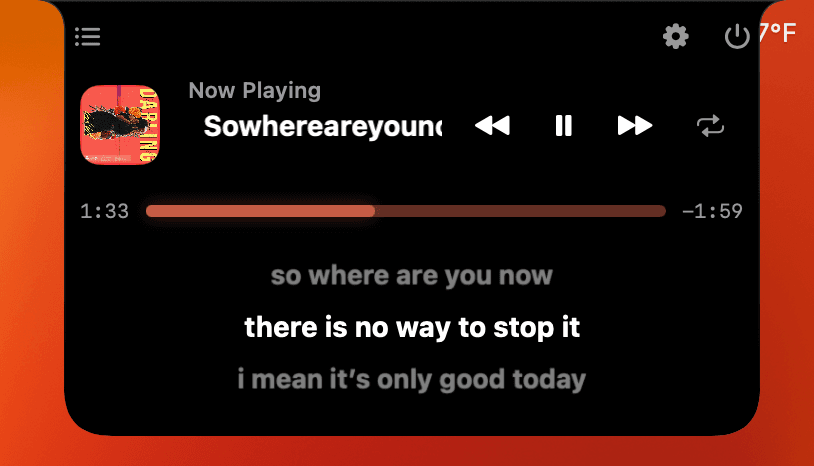
A free native macOS utility that turns the MacBook notch into an expandable dashboard for media controls, live lyrics, and 17 optional modules.
- Codebase
- ~25K lines of Swift
- Latest release
- v2.15, July 2026
- Distribution
- Signed, notarized, Sparkle delta updates
- Platform
- macOS 14+, universal binary
Overview
WaveNotch is a free macOS utility that turns the area around the MacBook notch into an expandable dashboard for now-playing controls, live lyrics, and small tools such as a Pomodoro timer, a calendar, and a file tray.
My role
I built the app alone: 113 commits and about 25,000 lines of Swift, from the first commit in April 2026 to v2.15 in July 2026, across 26 release builds. Others contributed to the marketing website.
How it works
- PlayersSpotify, Apple Music, Safari, Chrome, Brave, Edge
- Media engineDistributed notifications, AppleScript, injected JavaScript
- Lyrics pipelineFour providers, match scoring, LRC sync
- Notch panelNon-activating SwiftUI panel across all Spaces
Engineering decisions
Detecting playback without a private media API
- Problem
- macOS has no public API that reports what’s playing across every app, and browser players don’t expose their state to other apps.
- Approach
- The engine listens for Spotify and Apple Music distributed notifications, then uses AppleScript to inject JavaScript that reads player state from the page in supported browsers, including YouTube, YouTube Music, and the Spotify web player.
- Trade-off
- DOM scraping breaks when a site changes its markup, and it needs the user’s Automation permission. I accepted that to avoid depending on a private framework that an OS update could remove.
Staying quiet in the background
- Problem
- A menu bar utility runs all day, so polling several browsers can’t become a constant CPU cost.
- Approach
- A coalescing gate merges overlapping fetches, poll intervals adapt to state from 1.5 to 12 seconds, and a throttled policy limits how often browser tabs are rescanned. The hardware monitor’s timer runs only while its view is visible.
- Trade-off
- Slower polling means slightly later updates when idle. I haven’t measured before-and-after CPU numbers yet, so I don’t quote any.
A lyrics pipeline that tolerates bad data
- Problem
- No single lyrics provider has everything, and search results often match the wrong song.
- Approach
- Four providers (LRCLIB, KuGou, NetEase, and lyrics.ovh) are queried in parallel with a task group. Matches are scored, ticket IDs discard stale results when the track changes, lines sync to playback with a per-song offset, and the cache is capped at 250 entries.
- Trade-off
- Parallel queries use more network than a fallback chain, but every provider gets a chance on each track and the best-scoring match wins.
Modules as a catalog, not a plugin runtime
- Problem
- I wanted users to add features such as a calendar or file tray without cluttering the notch.
- Approach
- A catalog of 17 built-in modules appears in an in-app store, and each one is switched on independently. Modules are compiled in rather than loaded dynamically.
- Trade-off
- This is simpler and safer than a true plugin runtime, but third parties can’t extend the app. For one developer, that’s the right call.
Testing
This is the project’s weakest area. The released code has almost no automated tests, and AppleScript, browser scraping, and windowing are verified by hand. I’m adding Swift Testing unit tests for polling policies and utilities in my current development work, which hasn’t shipped yet.
What I’d do next
- Measure CPU and energy use so the polling work has real numbers behind it.
- Split the largest SwiftUI file, which grew past 5,000 lines.
- Add CI for builds and tests.
Credits: The media engine, lyrics pipeline, and modules are my own. A small window helper and the file-drag detector are adapted from the open-source boring.notch project (GPL-3.0), and the notch outline follows the same approach as DynamicNotchKit.